A distraction-free writing device is any tool — hardware or software — designed to give you one thing: a blank page and nothing else competing for your attention. The 11 options below range from dedicated e-ink hardware to free browser apps. The best one is whichever format matches how your procrastination actually works.
You sit down to write. You open your laptop. Forty minutes later, you’ve done everything except write.
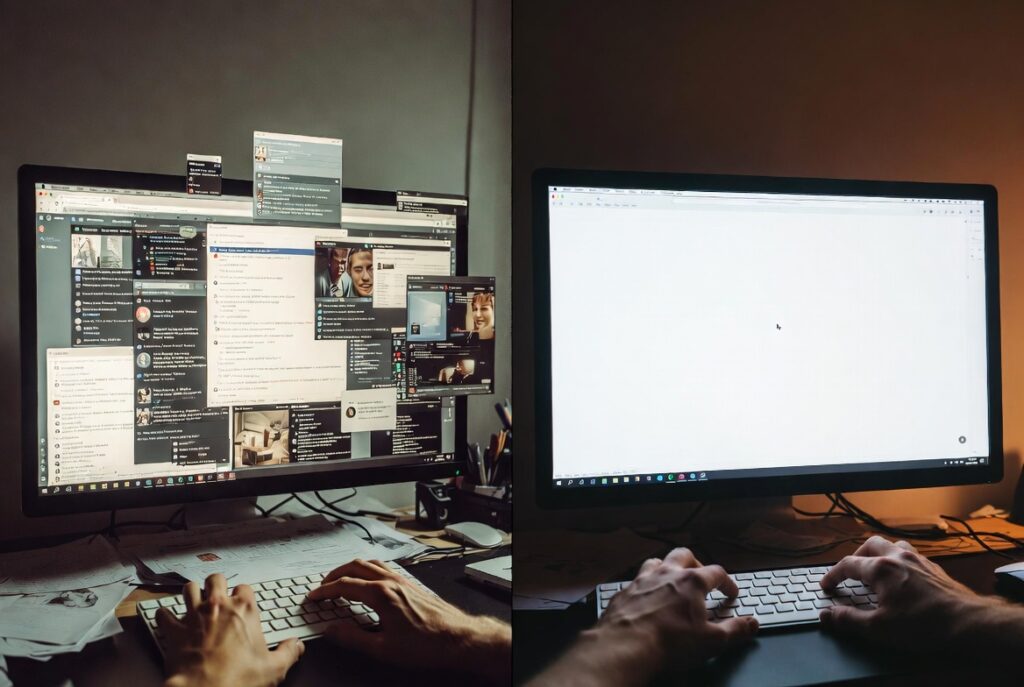
This is not a character flaw. It’s what happens when your writing tool lives inside the same machine as your email, your news feed, your group chats, and the seventeen browser tabs you’ve been meaning to close since Tuesday. The environment is working against you before you type a single word.
A distraction-free writing device doesn’t make you a better writer. It stops the environment from making you a worse one.
The list below covers 11 options — hardware devices, dedicated software, and free tools — ranked by how writers actually use them, not how they’re marketed. By the end, you’ll know exactly which one fits your workflow, your budget, and the specific way you tend to lose focus.
The right tool won’t fix unclear thinking. But it will stop a clear mind from being interrupted every six minutes.
Table of Contents
What Makes a Writing Device “Distraction-Free”
Before the list, a quick definition — because this phrase gets used loosely.
A distraction-free writing device does at least one of three things: it removes the interface (no toolbars, no menus, no visible clutter), it removes the exits (no browser, no notifications, no app-switching), or it removes the temptation structurally (a hardware device that simply cannot open Twitter).
The strongest options do all three. Most do one or two. Knowing which problem you’re actually solving tells you which tier of tool you need.
[Key Insight]: Most writers overestimate how much they need a hardware device and underestimate how much a free distraction-free writing app — used with actual commitment — can accomplish. Start with software. Move to hardware only if software consistently fails you.
The 11 Best Distraction-Free Writing Devices
1. Freewrite Smart Typewriter
The Freewrite is the device most people picture when they hear “distraction-free writing device.” It’s a physical machine with a mechanical keyboard, an e-ink display, built-in Wi-Fi for cloud sync to Google Drive or Dropbox, and no browser. No apps. No way to check anything.
It is heavy, expensive (around $549), and completely single-purpose. You turn it on, you write. That’s the product.
Best for: Professional writers, novelists, and essayists who draft long-form content daily and want a physical object that carries the psychological weight of a writing ritual.
Limitation worth knowing: You cannot research or revise on this device. It’s a drafting tool only. If your writing process requires frequent source-switching, this will actively slow you down.
2. Freewrite Traveler
The Traveler is the portable sibling of the Freewrite Smart Typewriter — lighter, foldable, and significantly more practical for writers who work away from a fixed desk. The same e-ink display, the same cloud sync, a slightly quieter keyboard.
At around $349, it’s still a significant investment for a single-purpose tool. But for the right writer, the portability tips the value equation.
Best for: Freelancers, journalists, and travel writers who need a focused drafting environment that isn’t tied to a desk.
3. AlphaSmart Neo2
The AlphaSmart Neo2 is the cult-favorite distraction-free writing device that predates the current wave of minimalist tools. Originally built for schools, it’s now beloved by writers who want a zero-distraction experience at a fraction of the cost of a Freewrite.
It runs on AA batteries — reportedly for hundreds of hours. The screen is small, it holds files for USB transfer to a computer, and it does absolutely nothing else. You can find them secondhand for $30–$80.
Best for: Budget-conscious writers who want the hardware experience without the hardware price tag.
Limitation worth knowing: The screen is four lines of text. No Wi-Fi, no cloud sync. File transfer requires USB. For some writers, this friction is the appeal. For others, it’s a dealbreaker.
4. reMarkable 2
The reMarkable 2 is an e-ink tablet built primarily for note-taking and document annotation, but writers have adopted it in significant numbers as a low-distraction drafting surface. It has an extremely paper-like writing experience, no browser, no social apps, and a display that’s easy on the eyes during long sessions.
Best for: Writers who prefer typing with an optional keyboard cover, or those who like to draft by hand and then convert to text via the built-in handwriting recognition.
Limitation worth knowing: The typing experience requires the additional keyboard folio (sold separately). Without it, the reMarkable is better suited for handwritten notes than typed drafts.
5. iA Writer
iA Writer is the distraction-free writing software that consistently tops serious writers’ shortlists — and for good reason. It strips the interface to almost nothing: a blank page, your words, and a minimal toolbar that disappears when you’re typing.
Its Focus Mode highlights only the sentence you’re currently writing, dimming everything else. The Syntax Highlight Mode can visually mark adjectives, adverbs, and passive voice — useful for writers who want to self-edit without switching tools.
Available on macOS, iOS, Windows, and Android. One-time purchase on most platforms, with no subscription.
Best for: Writers who want a polished, purpose-built distraction-free writing app that covers drafting, light editing, and markdown formatting in a single clean environment.
[Pro Tip]: iA Writer’s Focus Mode combined with a Cold Turkey site block during your writing session is one of the most effective free-plus-software combinations available. You get visual isolation and browser isolation simultaneously.
6. Ulysses
Ulysses is a writing app with more structure than iA Writer — it includes a library system for organizing drafts, a full-screen composition mode, and export options to PDF, Word, and ePub formats.
It’s subscription-based (around $5.99/month or $39.99/year), which puts some writers off. But for those managing multiple long-form projects simultaneously, the organization layer justifies the cost.
According to the developers, Ulysses has over 1 million registered users — which speaks to its sustained adoption beyond novelty.
Best for: Authors, bloggers, and content teams managing multiple long-form projects who want a distraction-free environment with built-in project organization.
Limitation worth knowing: macOS and iOS only. Windows users should look at iA Writer or Scrivener instead.
7. FocusWriter
FocusWriter is the best free distraction-free writing app for desktop users. It opens to a full-screen, themeable writing environment — you can set background images, adjust fonts, and enable a typewriter scroll mode that keeps your current line centered on screen.
It’s free, open-source, and available on Windows, macOS, and Linux. No subscription, no account, no cloud dependency.
Best for: Writers who want a no-cost distraction-free writing device alternative that still offers a thoughtful, customizable interface.
Limitation worth knowing: No mobile version, no cloud sync. Your files live locally. For writers who move between devices, this is a significant constraint.
8. Draft
Draft is a browser-based distraction-free writing online tool that takes a different approach from most on this list. Its key feature is version control — every draft is saved, every change is tracked, and you can restore any previous version. It also supports collaborative editing with comment-level feedback.
Free for core features, with an optional paid tier.
Best for: Writers who work with editors or collaborators and want a focused environment that doesn’t sacrifice version history.
9. Hemingway Editor
The Hemingway Editor is less a drafting tool and more a clarity tool — it highlights long sentences, passive voice, unnecessary adverbs, and complexity in real time. The interface is clean and full-screen, which makes it technically a distraction-free writing online option, but its real value is in post-draft editing.
Free in browser form. A one-time paid desktop version is also available.
Best for: Writers whose distraction problem shows up during the editing phase — where perfectionism and endless revision loops kill productivity more than notifications do.
[Note]: Hemingway Editor’s color-coded suggestions are genuinely useful, but over-reliance on them can flatten writing voice. Use it as a signal, not a verdict. A highlighted sentence isn’t automatically a bad sentence.
10. Cold Turkey Writer
Cold Turkey Writer is a distraction-free writing device experience built entirely around commitment. You set a word count goal or a time limit, and the app locks your entire computer to a full-screen writing interface until you hit it.
You cannot minimize it. You cannot switch windows. The only way out is to write your way out — or restart your computer (which Cold Turkey logs as giving up).
Free for basic use, with a paid version that adds scheduling.
Best for: Writers who have tried every other tool and still find themselves escaping to a browser tab. The enforced commitment removes the decision entirely.
Limitation worth knowing: Not for writers who need to research mid-session. This tool assumes your research is done and your only job is to produce words.
11. Notion (Distraction-Free Mode)
Notion’s full-screen writing mode is the most understated entry on this list. It’s not purpose-built as a distraction-free writing device — Notion is a general productivity platform — but for writers already living inside Notion for notes, planning, and research, its full-screen document mode creates a genuinely clean drafting environment.
No extra tool to learn. No additional subscription. Just press full-screen and write.
Best for: Writers already embedded in the Notion ecosystem who want focused drafting without switching apps.
Limitation worth knowing: Notion requires internet. It’s only as distraction-free as your personal discipline with browser navigation. If you open a new tab the moment things feel hard, Notion’s focus mode won’t stop you.
How to Choose the Right Distraction-Free Writing Device for You
The comparison below cuts through the noise.
| Device / Tool | Type | Cost | Best For | Key Trade-off |
|---|---|---|---|---|
| Freewrite Smart Typewriter | ⌨️ Hardware | ~$549 | Daily long-form drafters | Expensive, draft-only |
| Freewrite Traveler | ⌨️ Hardware | ~$349 | Writers who travel frequently | Same limitations as above |
| AlphaSmart Neo2 | ⌨️ Hardware | $30–$80 (used) | Budget hardware seekers | Tiny screen, no Wi-Fi |
| reMarkable 2 | ⌨️ Hardware | ~$299+ | Handwriters and annotators | Keyboard sold separately |
| iA Writer | 💻 Software | One-time purchase | Most serious writers | No project library system |
| Ulysses | 💻 Software | ~$40/year | Multi-project writers (Mac only) | Subscription, macOS/iOS only |
| FocusWriter | 💻 Software | Free | Desktop users, no budget | No mobile, no cloud sync |
| Draft | 🌐 Browser | Free | Collaborative writers | Browser-based, needs discipline |
| Hemingway Editor | 🌐 Browser | Free | Editing phase, not drafting | Not a drafting tool |
| Cold Turkey Writer | 💻 Software | Free / Paid | Writers who need enforcement | No mid-session research |
| Notion (Focus Mode) | 🚀 Platform | Free / Paid | Writers already using Notion | Internet required |
[Important]: The most common mistake writers make is choosing a tool based on how they wish they worked rather than how they actually work. If you consistently need to research mid-draft, a hardware device will frustrate you within a week. Be honest about your process before you spend anything.
The Setup That Works Before You Spend a Dollar
Here is the specific sequence that creates a solid distraction-free writing environment using only tools you already have:
- Open FocusWriter, iA Writer, or even a plain text editor — set it to full-screen.
- Install Cold Turkey Blocker or Freedom and block your five highest-distraction sites for the duration of your session.
- Put your phone in another room. Not on silent — in another room. Research from the University of Texas at Austin shows that a smartphone’s mere presence on a desk reduces available cognitive capacity, even when it isn’t being used.
- Write one sentence before you open anything else in the morning. One sentence. It breaks the inertia.
- Set a session goal — not a time goal, a word goal. “I’ll write 400 words” is more effective than “I’ll write for 45 minutes.”
This system costs nothing and takes ten minutes to implement. Try it for two weeks before concluding you need dedicated hardware.
What No Distraction-Free Writing Device Can Fix
This is the part most articles quietly skip.
A distraction-free writing device solves an environmental problem. It cannot solve a structural one. If you’re staring at a blank page because you don’t know what you’re trying to say, because the project feels overwhelming, or because you have a low-grade dread of the writing itself — no tool resolves that. The blank screen just becomes a more focused version of the same problem.
The writers who benefit most from focused writing environments are those whose thinking is clear and whose primary obstacle is the environment pulling them away from the work.
If that’s you — if you have something to say and keep losing the thread because your device keeps dragging you elsewhere — then any of the 11 options above will help. Some more than others, depending on your budget and workflow.
If the block is deeper than that, the first investment worth making is in clarity: an outline, a brief, a simple sentence that says what this piece of writing is actually trying to do.
What is the best distraction-free writing device for writers on a budget?
Is a dedicated distraction-free writing device worth buying?
What’s the difference between distraction-free writing software and a regular app’s focus mode?
Can I use a distraction-free writing device if I need to research while writing?
Is distraction-free writing online as effective as offline tools?
What distraction-free writing app works on both Mac and Windows?
What if I try a distraction-free writing device and still can’t focus?
The right distraction-free writing device isn’t the one with the best reviews — it’s the one that matches how you actually lose focus. If it’s hardware temptation, a physical single-purpose device solves it. If it’s browser drift, a full-screen software tool with a site blocker covers it. If budget is the constraint, the free options on this list are genuinely good.
Three things to carry forward: your environment shapes your output more than your intentions do; the best tool is the one you’ll open consistently; and no device replaces knowing what you’re trying to say before you start.
If you’re ready to build a writing workflow that actually protects your focus, explore the tools and resources put together for writers at Geniostack.com — writing tools and workflows for focused creators.