
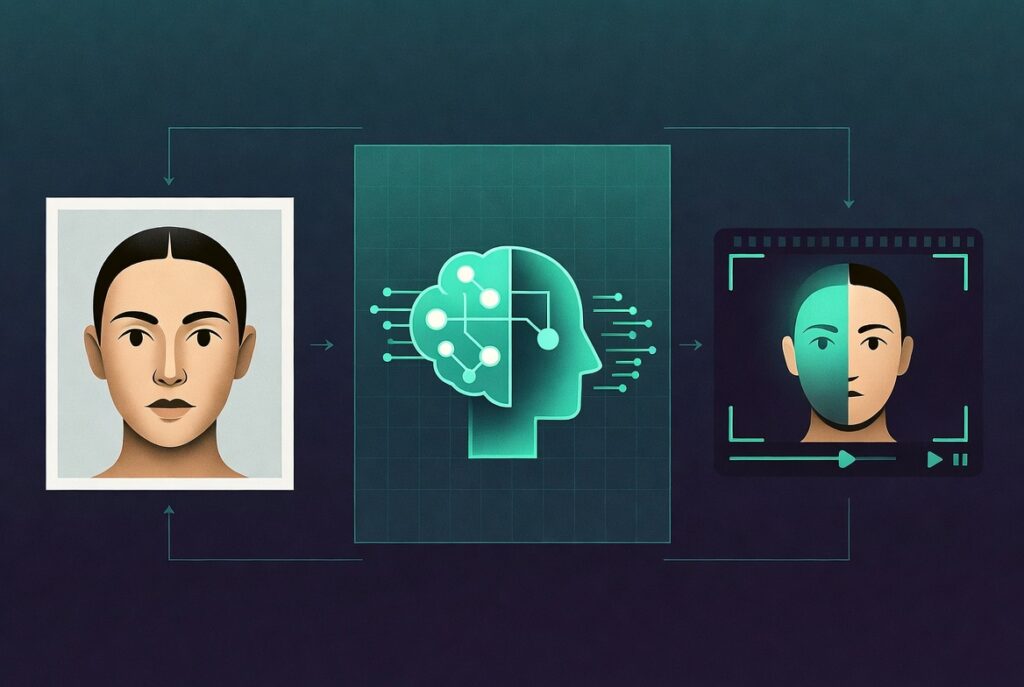
An AI face swap video is a clip in which artificial intelligence detects and replaces one person’s face with another using deep learning models — specifically GANs (Generative Adversarial Networks) or diffusion-based methods. The process works by analysing facial geometry, lighting, and skin tone, then seamlessly blending the replacement face frame by frame. Modern tools make this achievable in minutes, even for beginners.
Imagine placing yourself inside a Hollywood film scene, giving a product demo as a celebrity avatar, or translating your video content into a new language while keeping your face perfectly in sync. That is exactly what AI face swap video technology now makes possible — and it is no longer the exclusive domain of big-budget studios.
Whether you are a content creator experimenting on TikTok, a marketer producing localised ads, or a developer building the next viral app, understanding how AI video face swap works — and which tools actually deliver — is becoming a core skill. The wrong tool wastes hours. The right one produces results in under five minutes.
This guide covers everything: how the technology works, the best free and paid tools (including Vozo AI video face swap and TikTok’s native AI face swap video 3.0), a step-by-step tutorial for beginners, and honest trade-offs you need to know before you start.
💡 Key Takeaway
The best AI face swap video results come from high-quality source footage, well-lit consistent frames, and the right tool for your specific platform.
Table of Contents
What Is an AI Face Swap Video?
An AI face swap video is any video in which a person’s face has been replaced or overlaid using machine learning algorithms. Unlike older masking techniques that required painstaking manual frame-by-frame editing, modern AI models detect facial landmarks automatically — eyes, nose, jawline, skin tone — and blend the new face with motion-consistent, lighting-aware precision.
The term covers a spectrum of use cases: entertainment deepfakes, movie visual effects, content localisation (lip-sync translation), avatar creation, and harmless creative experiments on short-form video platforms like TikTok.
How Does AI Face Swap Video Technology Work?
At its core, most AI video face swap systems rely on one of two model architectures:
- GAN-based models (Generative Adversarial Networks) — a generator creates the swapped face while a discriminator judges its realism. Repeated training makes the output increasingly convincing.
- Diffusion models — a newer approach that de-noises facial data across many steps, producing photorealistic results with fewer artefacts in complex lighting scenarios.
The AI extracts a 3D facial mesh from the source, maps it to the target face’s proportions, and re-renders it frame by frame — adjusting for head movement, occlusion (hair, hands), and ambient lighting. High-end tools process this in near real-time; browser-based or free tools may batch-render offline.
💡 Expert Insight
In practice, the single biggest quality factor is source image resolution. A 4K source face with consistent lighting will produce dramatically cleaner swaps than even the best AI model working with a blurry 480p input.
Top AI Face Swap Video Tools Compared
The market for AI video face swap tools has expanded rapidly, ranging from browser-based free apps to professional-grade platforms with API access. Here is an honest comparison of the most widely used options.
| Tool | Best For | Free Tier | Video Support | Best For |
|---|---|---|---|---|
| Vozo AI | Vozo AI video face swap | Free Plan | ✅ Yes | Content creators & marketers |
| Reface | Quick mobile swaps | Free Tier | ✅ Short clips | Casual / social media |
| DeepFaceLab | High-quality deepfakes | Open Source | ✅ Full video | Developers / power users |
| HeyGen | AI avatar & lip-sync | Limited Free | ✅ Long-form | Business video localisation |
| TikTok AI Face Swap 3.0 | In-app TikTok creation | Free | ✅ Short-form | TikTok creators |
| FaceSwapper.ai | Simple web-based swap | Free | ✅ Limited | Beginners, quick demos |
Vozo AI Video Face Swap — A Closer Look
Vozo AI is one of the more versatile platforms in this space. It combines AI face swap video capabilities with voice cloning and lip-sync translation, making it popular among marketers who need to localise video content across multiple languages without re-filming. The interface is browser-based, requiring no local GPU — a genuine advantage for non-technical users.
The free tier supports short clips and lower resolution outputs. Paid plans unlock 4K exports, batch processing, and API access for developers integrating face swap into larger workflows.
🔗Exploring the broader world of AI-generated content? Geniostack.com covers the full landscape of AI creation tools — from video to text to image — with hands-on reviews and workflow guides.
Face Swap Video AI Free — What You Can Realistically Expect
Free tools genuinely work — but with trade-offs worth understanding before you commit hours of footage to one. Most free AI face swap platforms limit output resolution (often 720p), add watermarks, cap clip length (typically under 60 seconds), and queue your render behind paid users. For casual content or testing, this is fine. For professional deliverables, plan to upgrade.
✅ Pros of Free Tools
- No upfront cost — ideal for experimentation
- Browser-based — no GPU required
- Fast iteration for learning
- Sufficient for TikTok & short-form content
⚠️ Cons of Free Tools
- Watermarks on exported video
- Limited to short clips (<60 seconds)
- Lower resolution outputs
- Slower render queues
- Privacy concerns with cloud processing
How to Make an AI Face Swap Video — Step-by-Step
Whether you are using a free browser tool or a paid platform, the core workflow for creating an AI video face swap follows the same logical sequence. Here is a beginner-friendly walkthrough using a general cloud-based tool (steps apply to most platforms including Vozo, FaceSwapper.ai, and similar).
- 1Prepare your source face imageChoose a high-resolution, front-facing photo with even lighting and no obstructions (sunglasses, heavy shadows). A clean JPEG or PNG at 1080p or above gives the AI the best data to work with. Avoid images where the face is partially cropped.
- 2Select or upload your target videoThis is the footage whose face will be replaced. MP4 is universally supported. Ensure the target person’s face is visible, reasonably well-lit, and not heavily obscured. The AI needs sufficient facial frame coverage to work reliably.
- 3Upload both files to your chosen toolNavigate to your platform (e.g., Vozo AI, FaceSwapper.ai), upload the source face photo and the target video. Most tools auto-detect faces — if there are multiple faces in the video, you will be prompted to select which one to swap.
- 4Configure settings (if available)Some platforms offer blend strength, face smoothing, skin tone matching, and output resolution controls. For natural results, start with default settings. If the swap looks harsh, reduce the blend strength or enable skin tone normalisation.
- 5Process and renderSubmit the job. Cloud tools typically render in 1–10 minutes depending on clip length and server load. Free tier users may wait longer. Desktop tools like DeepFaceLab run locally and render speed depends on your GPU.
- 6Review, refine, and exportWatch the output at full resolution. Check for edge artefacts around the hairline and jaw, lighting mismatches, and any flickering between frames. If quality is insufficient, try a higher-resolution source image or a different tool. Export in your required format and resolution.
💡 Pro Tip
For TikTok specifically — using AI face swap video 3.0 within the app itself (via Effects > AI tools) is often faster than third-party tools because it is optimised for the platform’s resolution and aspect ratio, and requires no external upload.
AI Face Swap Video 3.0 on TikTok — What Makes It Different
TikTok’s AI face swap video 3.0 is the platform’s most advanced iteration of its in-app face replacement effect. Unlike third-party tools that require file uploads and offline rendering, this feature processes entirely within the app in near real-time, making it accessible to anyone with a TikTok account.
Key differentiators include motion prediction (the swapped face tracks head movement more fluidly), improved lighting adaptation (it reads the ambient light in the scene, not just a static reference), and seamless integration with TikTok’s duet and stitch workflows. Creators report that version 3.0 produces notably fewer edge artefacts around the hairline compared to earlier iterations.
One honest limitation: TikTok’s system applies its own content moderation to face swap outputs, which may automatically reject swaps involving public figures. This is a platform-level policy, not a technical failure.
Real-World Use Cases for AI Video Face Swap
Beyond viral entertainment, AI face swap video has carved out legitimate professional use cases that are worth knowing if you are evaluating this technology for a business context.
- Video localisation: Brands use face swap combined with AI lip-sync to translate spokesperson videos into multiple languages without re-shooting — the face moves naturally with the dubbed audio.
- E-learning and training content: Instructional video producers swap instructor faces to localise content for regional markets or update a course’s presenter without re-filming all footage.
- Entertainment and fan content: Creators produce parodies, re-imaginings, and tribute videos by placing their face into iconic film or TV scenes.
- Product marketing: Some brands have used AI face swap to personalise video ads — inserting the viewer’s likeness into a product scenario (with consent).
- Virtual try-on: Fashion and beauty brands experiment with face swap as a lightweight alternative to full AR try-on, applying makeup, hairstyles, or accessories to the user’s face in video.
🔗Want to see how face swap fits into a larger AI video production workflow? Read our guide on the best AI video creation tools for content creators — covering everything from scriptwriting to automated editing.
Ethical Considerations and Responsible Use
Any guide on AI face swap video that skips the ethics section is doing you a disservice. The same technology that powers creative entertainment can be misused — and the legal and reputational consequences of misuse are severe.
Always obtain explicit consent before swapping any real person’s face into video content, particularly if that content will be published or shared. Many jurisdictions now have specific legislation covering synthetic media and non-consensual deepfakes — the UK, EU, and several US states have enacted or are actively passing relevant laws.
Most reputable platforms build in safeguards: celebrity face detection, content moderation, and output watermarking. These exist for good reason. Responsible use means treating these guardrails as floors, not obstacles.
⚖️ Trustworthiness Note
Geniostack recommends only using AI face swap video for content where you have the rights to both the source face and the target footage — including your own likeness, licensed stock video, or footage with written consent from all subjects.
🔗For an authoritative overview of deepfake legislation and synthetic media ethics, the MIT Media Lab’s Human Dynamics group publishes ongoing research on responsible AI media — opens in a new tab.
Putting It All Together
AI face swap video has moved from a Hollywood speciality to an accessible creative tool — but using it well means understanding both its power and its limits.
- Quality starts with your source. No AI model compensates for a blurry, poorly lit input image.
- Match the tool to your goal. Casual TikTok content → use in-app AI face swap video 3.0. Professional localisation → consider Vozo AI. Developer workflows → DeepFaceLab or API-based platforms.
- Consent is non-negotiable. Use this technology only on content you have the rights to — ethically and legally.
The creative possibilities are genuinely exciting. The infrastructure to execute them well — from script to final export — is exactly what we cover at Geniostack.Explore AI video creation tools on Geniostack →