AI automation tools are no longer a luxury reserved for enterprise companies with massive IT budgets. Today, anyone — from solo freelancers to growing startups — can automate entire business operations using powerful platforms that require zero coding knowledge.
But here’s the real problem: most popular automation tools are packed with restrictions. Free plans lock you out of advanced features. Usage caps kill your momentum. Integrations are gated behind expensive upgrades.
I’ve tested dozens of platforms, and the frustration is real: one tool caps you at 100 tasks, another charges per step, and suddenly your ‘automation’ costs more than hiring help. That’s why I prioritize AI automation tools with no restrictions — self-hosted open-source options and fair-priced platforms that let you scale workflows without artificial limits or surprise bills.
In this guide, you’ll discover:
- What AI automation tools are and how they work
- The best tools available (free and paid)
- Which platforms have the fewest restrictions
- How to choose the right tool for your workflow
- Real use cases for freelancers, startups, and enterprises
Whether you’re looking for AI automation tools for business, a free AI workflow automation solution, or exploring options like Droven.io, this guide covers everything you need to make a smart decision.
What Are AI Automation Tools?
AI automation tools are software platforms that use artificial intelligence and rule-based logic to automatically perform repetitive tasks across apps, systems, and workflows—without manual input.
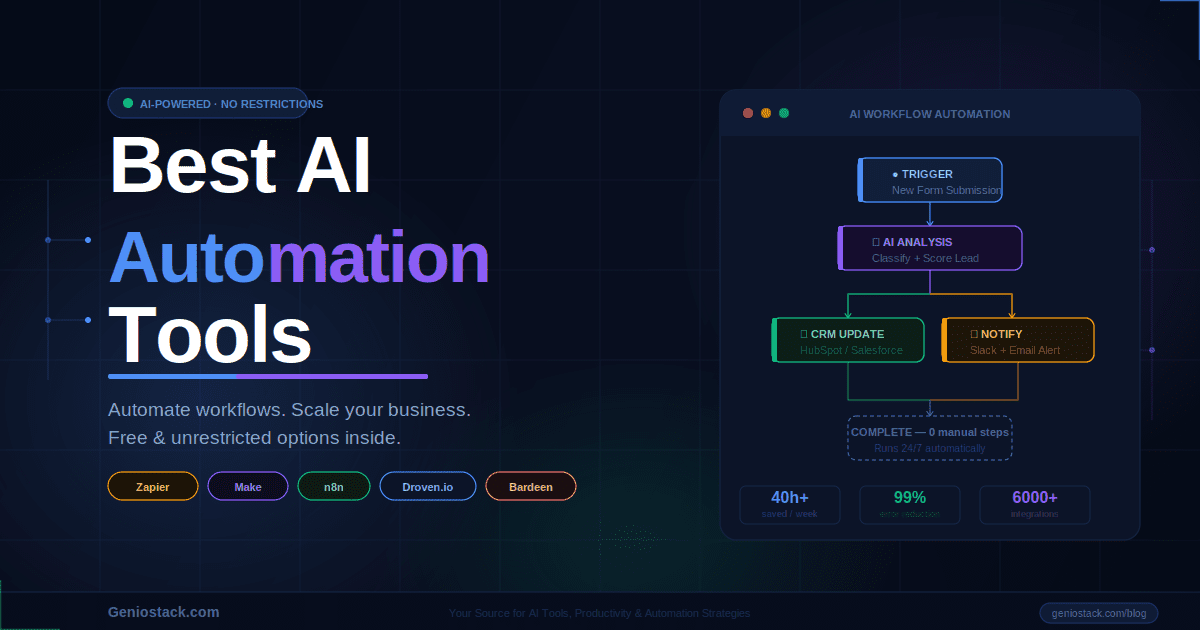
They act like intelligent bridges between your apps. You define a trigger — say, a new Gmail arrives with an attachment — and the actions that should follow, like saving the file to Drive, notifying your team in Slack, and updating a row in your CRM. Once live, it runs reliably in the background 24/7.
Modern AI-powered versions go further—they can:
- Understand natural language to build workflows from plain text prompts
- Make decisions based on data conditions
- Learn from patterns to optimize workflow performance
- Connect hundreds of apps through pre-built or custom integrations
💡 Key Insight: The difference between basic automation and AI automation is intelligence. Basic tools follow fixed rules. AI tools adapt, interpret context, and handle exceptions—making them far more powerful for complex, real-world workflows.
Best AI Automation Tools With No Restrictions
Here’s a breakdown of the top platforms — evaluated on features, freedom, integrations, and pricing transparency.
1. n8n — Best Open-Source AI Workflow Automation Free Option
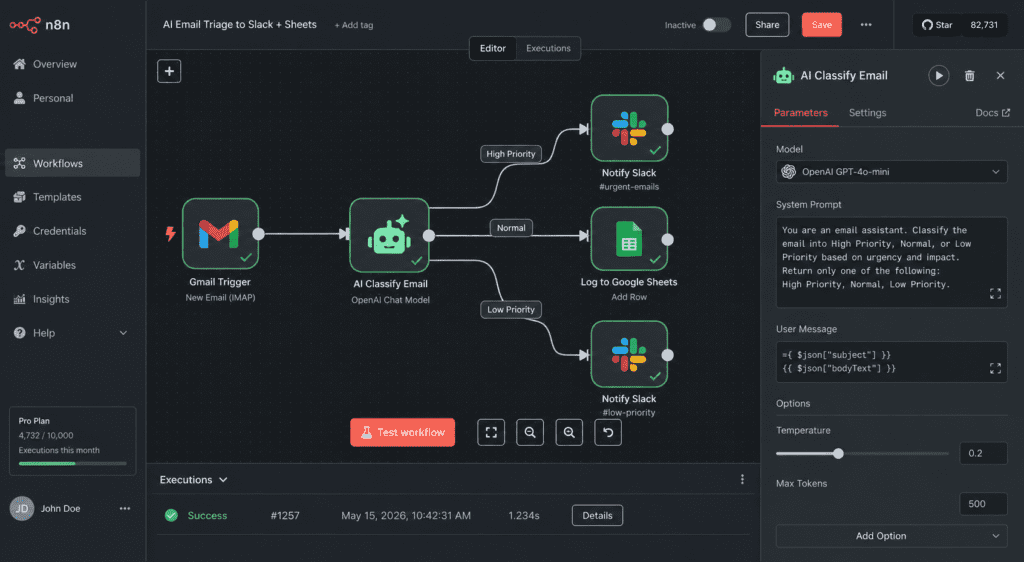
n8n gives you unmatched freedom as a fully open-source (fair-code) automation tool. You can self-host it on your own server or VPS for truly unlimited workflows, executions, and users—no task limits, no per-operation fees. It also has a convenient cloud version if you prefer managed hosting.
Why it stands out:
- Fully open-source (fair-code license)
- Self-host for unlimited workflows, executions, and users
- 400+ native integrations
- Built-in AI nodes (OpenAI, LangChain, vector stores)
- Visual drag-and-drop workflow builder
Restrictions? On self-hosted plans — practically none. The cloud free tier has execution limits, but hosting your own instance removes them entirely.
Best for: Developers, technical teams, and power users who want maximum flexibility without paying per task.
🔗 Explore n8n’s open-source automation platform
2. Make (formerly Integromat) — Best Visual Automation for Businesses
Make is one of the most visually intuitive AI automation tools for business. Its drag-and-drop scenario builder makes complex multi-step workflows feel easy.
Key features:
- 1,500+ app integrations
- Advanced data manipulation (filters, routers, aggregators)
- HTTP/webhook support for custom API connections
- AI tools integration (OpenAI, Anthropic, HuggingFace)
- Free plan with 1,000 operations/month
Restrictions? The free tier is limited, but paid plans start affordably and scale well. Unlike Zapier, Make doesn’t charge per “task step” — it charges per operation, making complex workflows more cost-effective.
Best for: Marketing teams, e-commerce businesses, and agencies building multi-app workflows.
3. Zapier — Most Popular AI Automation Tool for Business
Zapier remains the most widely used automation platform globally, known for its massive app library and ease of use.
Key features:
- 6,000+ app integrations
- AI-powered Zap builder (describe your workflow in plain English)
- Multi-step Zaps with conditional logic
- Zapier Tables and Interfaces for lightweight databases and forms
Restrictions? Zapier’s free plan is fairly limited (100 tasks/month, single-step Zaps only). Multi-step Zaps require paid plans, and costs can escalate quickly at scale.
Best for: Non-technical users who need fast setup and access to the largest app ecosystem.
🔗 See Zapier’s automation integrations
4. Droven.io — Emerging AI Automation Tool Worth Watching
Droven.io is an emerging AI-native platform that lets you describe workflows in plain English and builds them automatically. It’s still growing its integration library and feature set, so it suits early adopters who value modern AI capabilities over battle-tested scale. Test it thoroughly before committing critical business processes.
Key features:
- AI-native workflow creation
- Designed for business process automation
- Focus on simplicity and speed of deployment
- Growing integration library
Restrictions? As an emerging platform, Droven.io is still expanding its feature set. It’s best suited for users who want a modern, AI-first experience and are comfortable with a platform that’s actively evolving.
Best for: Early adopters and businesses looking for cutting-edge AI workflow experiences.
⚡ Pro Tip: When evaluating newer tools like Droven.io, always check their API documentation and roadmap. A growing integration library is a positive signal — it means the platform is actively investing in becoming a full-stack automation solution.
5. ActivePieces — Best Free Open-Source Alternative to Zapier
ActivePieces is an open-source automation tool that positions itself as the no-restrictions alternative to Zapier.
Key features:
- Fully open-source and self-hostable
- 100+ integrations (growing rapidly)
- Clean, Zapier-like interface
- AI pieces for OpenAI, Google AI, and more
- Community-driven development
Restrictions? Self-hosted version is completely free with no caps. Cloud version has a generous free tier.
Best for: Small businesses and developers who want Zapier-style simplicity without the cost or restrictions.
6. Bardeen — Best AI Automation Tool for Browser-Based Workflows
Bardeen is a Chrome extension-based AI automation tool that automates tasks directly in your browser — no backend setup needed.
Key features:
- AI Magic Box: describe a task in plain English, Bardeen builds it
- Scrapes data from websites automatically
- Integrates with CRMs, project management tools, spreadsheets
- Runs automations in the background while you work
Best for: Sales teams, recruiters, and researchers who need browser-native automation without complex setups.
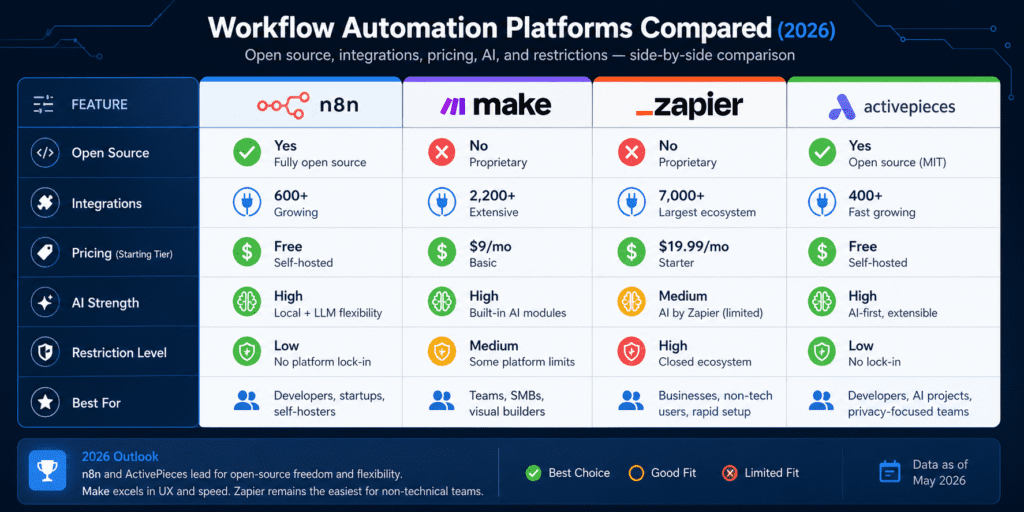
AI Automation Tools Comparison Table
| Tool | Free Plan | Open Source | AI Features | Best For |
|---|---|---|---|---|
| n8n | ✅ (self-host) | ✅ | Advanced | Developers & Power Users |
| Make | ✅ (1k ops/mo) | ❌ | Moderate | Business Teams |
| Zapier | ✅ (100 tasks) | ❌ | Strong | Non-Technical Users |
| Droven.io | ✅ (check site) | ❌ | AI-Native | AI-First Workflows |
| ActivePieces | ✅ (self-host) | ✅ | Growing | Zapier Alternative |
| Bardeen | ✅ | ❌ | Strong | Browser Automation |
Pricing Deep Dive & Real Cost Examples
n8n self-hosted: $0–$10/month (VPS). Make: Free tier sufficient for light use; Core plan (~$9/month) for serious workflows. Zapier: Can easily hit $50–300+/month at scale due to task pricing. Factor in your volume: a workflow running 5,000 operations/month on Make is often cheaper than Zapier’s equivalent. Always calculate based on your actual task volume, not marketing free tiers.
How to Choose the Right AI Automation Tool
With so many options available, picking the right platform comes down to a few key questions:
1. How technical is your team?
- Non-technical → Zapier or Make
- Technical/Developer → n8n or ActivePieces
2. Do you need a free or unrestricted plan?
- Truly free with no caps → n8n (self-hosted) or ActivePieces (self-hosted)
- Generous free cloud tier → Make or Bardeen
3. How many apps do you need to connect?
- Maximum integrations → Zapier (6,000+)
- Solid integration library → Make or n8n
4. Is AI central to your workflow?
- AI-native experience → Droven.io or Bardeen
- AI as one feature among many → n8n or Zapier
5. What’s your budget?
- Zero budget → n8n or ActivePieces (self-hosted)
- Flexible budget → Make (best price-to-power ratio)
Real-World Use Cases for AI Automation Tools for Business
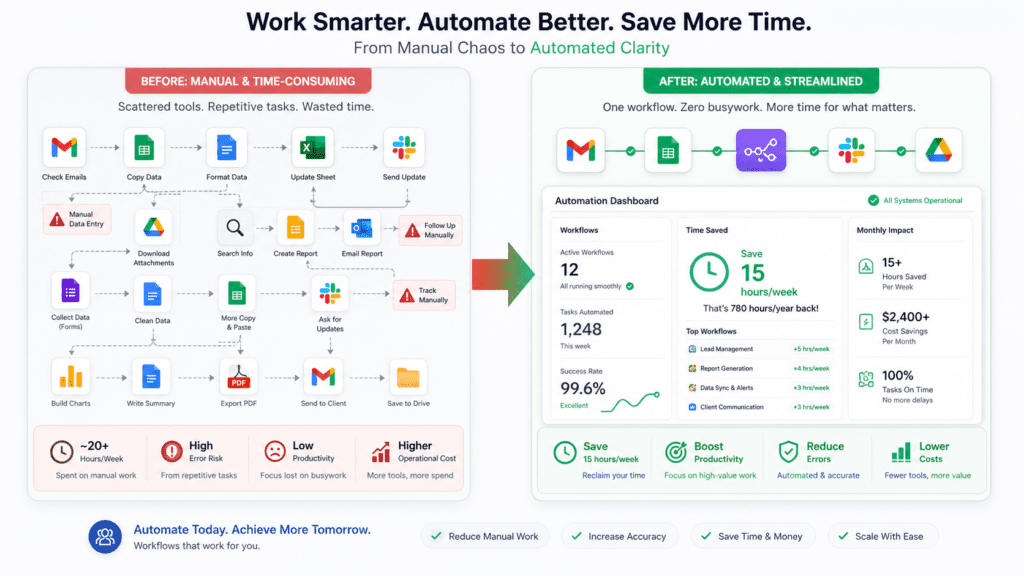
Real teams use these tools for high-impact results. For lead generation, connect Typeform or LinkedIn leads to an Airtable base, let AI enrich contact data and score quality, then push hot leads into HubSpot or Pipedrive with personalized follow-up emails drafted automatically. One marketing agency I advised cut manual lead work by 85% this way.
📌 Important Note: The ROI of AI automation tools for business is highest when you automate high-frequency, low-complexity tasks first. Start with tasks you repeat more than 10 times per week.
What are AI automation tools with no restrictions?
Are there AI workflow automation free options available?
What is Droven.io and how does it compare?
What are the best AI automation tools for business in 2026?
Can I use AI automation tools without coding knowledge?
Which AI automation tool has the fewest restrictions?
How do AI automation tools improve productivity?
Conclusion
AI automation tools have fundamentally changed how businesses operate — and the best part is, you don’t need a massive budget or a team of developers to take advantage of them.
Whether you’re looking for AI automation tools with no restrictions free (like n8n or ActivePieces), a powerful visual builder for your team (like Make), or an AI-native platform (like Droven.io), there’s a solution that fits your needs today.
Here are the key takeaways:
- Open-source tools (n8n, ActivePieces) offer the most freedom with no usage caps when self-hosted
- Make and Zapier are the best all-rounders for business teams of all sizes
- Droven.io is worth watching for AI-first automation experiences
- Start simple — automate your most repetitive tasks first, then expand
Ready to start automating? Explore the tools listed above, start with a free plan, and build your first workflow today. The hours you save this week compound into weeks saved over the years.