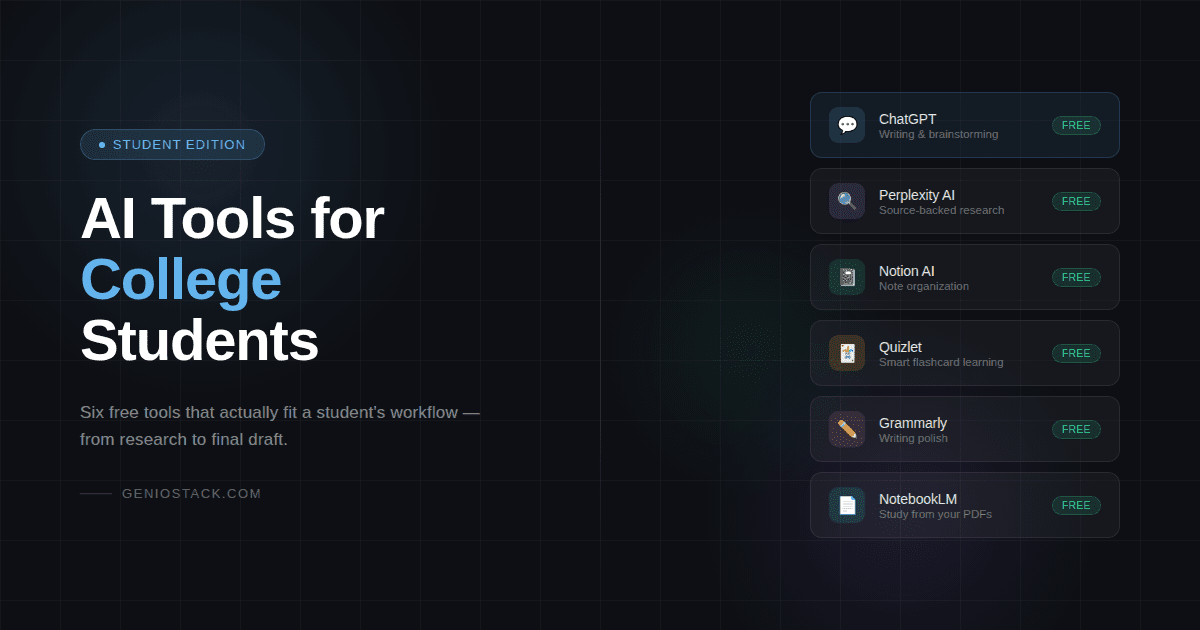
The best free AI tools for college students include ChatGPT (writing and research), Notion AI (note organization), Perplexity AI (source-backed research), Quizlet AI (flashcard learning), and Grammarly (writing polish). Most offer a free tier sufficient for everyday student use.
You’ve got a paper due Thursday, two readings you haven’t touched, and a group project where you’re somehow doing 80% of the work. Sound familiar?
AI tools for college students aren’t about cutting corners. They’re about reclaiming the hours that disappear into logistics — reformatting notes, searching for the right source, staring at a blank introduction. Those aren’t the parts of college that matter. The thinking is. The ideas are.
The problem is, most “best AI tools” lists dump 20 apps on you with no real guidance. They don’t tell you which tools actually fit a student’s workflow, which ones are genuinely free, or which ones will ghost you behind a paywall the moment you actually need them.
This guide fixes that. You’ll leave knowing exactly which tools to use, what each one is actually good for, and where the real limits are.
By the end, your study sessions will work harder than you do.
Table of Contents
What Most Students Get Wrong About AI Tools
Here’s the thing. A lot of students either avoid AI tools entirely — because it feels like cheating — or use them for everything indiscriminately, which leads to generic, hollow work that professors can spot immediately. Neither approach makes sense.
AI tools are leverage. They’re the difference between spending two hours formatting a bibliography and spending those same two hours actually understanding what you’re citing. Used well, they handle the mechanical parts of studying so your brain can do the meaningful parts.
The real question isn’t “should I use AI?” It’s “which AI does which job?” That’s exactly what this guide maps out.
The 6 Free AI Tools Worth Your Time (And What Each One Actually Does)
ChatGPT — Your All-Purpose Thinking Partner
What it is: ChatGPT is a conversational AI developed by OpenAI. You type a question or prompt, it responds with detailed, contextual answers. Think of it as a knowledgeable tutor available at 2 a.m.
The free tier (GPT-4o with usage limits) is powerful enough for most student needs. You can use it to brainstorm essay angles, explain complex concepts in simpler language, outline arguments, debug code for CS classes, or generate practice questions before an exam.
What most guides don’t mention: ChatGPT is best when you treat it like a thinking partner, not a writing machine. Paste in your rough draft and ask it to identify weak arguments. Give it a reading summary and ask what questions a professor might ask. That’s where it actually shines.
One real trade-off: it can confidently hallucinate sources. Never trust a citation it gives you without checking it independently.
Best for: Writing support, concept explanation, exam prep, coding help, brainstorming
Perplexity AI — Research With Sources You Can Actually Verify
What it is: Perplexity AI is a research-focused AI that answers questions by pulling from the live web and citing its sources inline. Unlike ChatGPT, it shows you where the information comes from — right next to the claim.
For college students doing research, this is genuinely significant. You can ask a question like “What are the economic effects of rent control?” and get a structured answer with links to academic papers, government data, and reputable publications — not just a paragraph that sounds authoritative.
According to Perplexity’s own documentation, the tool uses real-time web retrieval and shows citations so users can verify every claim. That’s exactly what academic integrity demands.
In practice, this usually means using Perplexity as your first step in any research process — not to write your paper, but to find out what’s worth reading. Then you go to the actual sources.
Best for: Starting literature reviews, finding credible sources quickly, current events research
Notion AI — Your Notes, Finally Organized
What it is: Notion AI is an add-on inside the Notion note-taking app that can summarize, rewrite, translate, and generate content directly within your workspace.
The base Notion app is free for students, and the AI features offer limited free uses per month before requiring an upgrade. For most students, the free tier is enough to experiment meaningfully.
Here’s where it earns its place: after a long lecture, you can paste your messy notes into Notion, ask the AI to summarize the key points, and have a study sheet in under 30 seconds. It also works for creating structured study guides from chaotic reading notes.
The edge case worth knowing about: Notion AI is only as good as the notes you give it. If your original notes are thin or disorganized, the AI summary will be too. It amplifies what’s there — it doesn’t invent clarity from chaos.
Best for: Summarizing lecture notes, creating study guides, organizing reading notes
Quizlet — Smarter Flashcards with AI-Powered Practice
What it is: Quizlet is a study platform with a long history, now enhanced with AI features that can generate flashcard sets from text you paste in, create practice tests, and adapt quiz difficulty based on your performance.
The free version covers core features including AI-generated flashcard sets. The Quizlet Q-Chat feature — an AI tutor that guides you through material conversationally — is available on the free tier with limits.
A Stanford research study found that students who studied with Quizlet scored on average 1.5 letter grades higher on their exams. That kind of result doesn’t come from passive scrolling — it’s the active recall effect that flashcards force.
Best for: Vocabulary-heavy subjects, memorization, science and law concepts, language learning
Limitation: Doesn’t work well for subjects that require deep conceptual understanding rather than recall. Essay-based humanities courses need different tools.
Grammarly — Writing Polish That Doesn’t Sound Like AI Wrote It
What it is: Grammarly is a writing assistant that checks grammar, clarity, tone, and style. The free version catches grammatical errors, unclear phrasing, and wordiness. The premium version adds deeper style suggestions and a plagiarism checker.
For non-native English speakers or students writing in a second language, the free version alone is transformative. But even native speakers benefit — there’s a specific kind of “almost-right” sentence that only shows up in your own writing and is nearly invisible to you. Grammarly catches it.
What Grammarly won’t do: fix a bad argument. It’ll make your weak paragraph grammatically polished, not intellectually stronger. Use it at the end of your editing process, not as a replacement for actual revision.
Best for: Final proofreading, tone checking, non-native English writers, professional emails to professors
Google NotebookLM — Study Smarter With Your Own Sources
What it is: Google NotebookLM is a free AI research tool that lets you upload your own documents — PDFs, lecture slides, class notes — and then ask questions specifically about those materials. Unlike ChatGPT, it doesn’t wander outside your provided sources.
This matters enormously for academic work. You upload the required readings, and then ask: “What does Chapter 4 say about the causes of the French Revolution?” It finds the answer from your materials, not the internet.
It’s currently free with a Google account, and it handles PDFs, Google Docs, YouTube URLs, and web pages as source material.
Best for: Working with assigned readings, building study guides from course materials, keeping research grounded
Quick Comparison: Which Tool for Which Task?
| Task | Best Tool | Free? | Best For |
|---|---|---|---|
| Writing a first draft | ChatGPT | ✓ (limited) | All subjects |
| Finding credible sources | Perplexity AI | ✓ | Research papers |
| Organizing lecture notes | Notion AI | ✓ (limited AI) | Science, history |
| Memorizing vocabulary | Quizlet | ✓ | Language, law, med |
| Proofreading final drafts | Grammarly | ✓ (basic) | All writing |
| Studying from course PDFs | Google NotebookLM | ✓ | Literature, law, history |
The Honest Trade-Off You Need to Understand
No AI tool replaces critical thinking. That’s not a disclaimer — it’s something most guides gloss over because they want you to feel good about everything.
Here’s what’s actually true: AI tools lower the cost of producing output. They make it faster and easier to generate text, summaries, and answers. That’s the strength and the danger simultaneously. When you use them to do your thinking for you, your thinking doesn’t develop. When you use them to support your thinking, you cover more ground faster and learn more in the same amount of time.
The students getting the most out of these tools aren’t the ones using AI to write their essays. They’re using AI to pressure-test their arguments, generate the counterpoints they hadn’t considered, explain a concept three different ways until one clicks.
That’s the mental model: AI as a thinking partner, not a ghostwriter.
How to Actually Set This Up (Step-by-Step)
- Start with one tool. Most students who try everything at once end up using nothing consistently. Pick the tool that matches your biggest pain point — writing, research, or memorization.
- Use ChatGPT or NotebookLM for your next research assignment. Don’t ask it to write your paper. Ask it to help you understand the topic and identify the strongest arguments.
- Paste your final draft into Grammarly before submitting anything. Run through its suggestions, but only accept changes that make the writing clearer — not just different.
- Create your next flashcard set in Quizlet using the AI generator. Paste in a lecture summary or textbook section and let it pull out the key terms and definitions.
- Review what worked. After one week, notice which tool actually saved you time versus which one added steps.
The compounding effect here is real. Students who build even one or two AI tools into their routine consistently outperform those who don’t — not because they’re smarter, but because they’re spending more of their time on the work that matters.
A Note on Android Access
All six tools listed here have fully functional Android apps — and most free AI tools for college students on Android perform just as well as their desktop versions. Grammarly integrates with your keyboard system-wide. Quizlet and Notion have dedicated apps. ChatGPT’s mobile app includes voice input, which makes it genuinely useful for recording rough thoughts between classes.
If you primarily study on your phone, the tools that work best on Android are Grammarly (for in-app writing), Quizlet (for on-the-go review), and Google NotebookLM (for reading and question-asking from uploaded PDFs).
Are these AI tools actually free, or do they hide behind paywalls?
Will professors know if I use AI to help write my essay?
Which free AI study tool is best for students who struggle with reading comprehension?
Can I use these tools on my phone, or are they desktop-only?
What if I try one and it doesn’t help?
Is there an AI tool that helps with math or STEM subjects specifically?
Do any of these tools work without reliable internet access?
Where This Leaves You
Three things worth taking with you: the right tool for each task matters more than using every tool; AI handles the mechanical parts of studying so you can focus on the thinking; and the students getting real results from these tools aren’t using them to do less work — they’re using them to do better work in less time.
You now know which tools are actually free, what they’re each built for, and where their real limits are. That’s more than most guides give you.
If you want to explore more tools that fit a student workflow — plus guides on using them effectively — a good place to continue is this collection of practical AI resources for learners and creators. It’s updated regularly and built for people who want depth, not just lists.